

Creating a Custom Laravel package is one of the best ways to write reusable, clean, and scalable code. Whether you want to share functionality across multiple projects or publish your package for others, Laravel makes package development elegant and powerful.
In this beginner-to-advanced guide, you will learn:
- What a Laravel package is
- How to create a custom Laravel package
- How to add and publish configuration files
- How to use the package inside a Laravel project
- Best practices for package development
What Is a Laravel Package?
A Laravel package is a reusable piece of code that adds functionality to your application. Laravel itself is built using packages. Common examples:
- Authentication packages
- Payment gateways
- Logging tools
- Custom helpers or services
Creating your own package helps you:
- Share your work with the community
- Reuse logic across projects
- Keep your code modular
Prerequisites
Before starting, make sure you have:
- PHP 8.1+
- Laravel 10 or later
- Composer installed
- Basic knowledge of Laravel Service Providers
Step 1: Create Package Directory Structure
Inside your Laravel project, create a packages directory:
mkdir packages
Now create your vendor and package name:

Recommended structure:
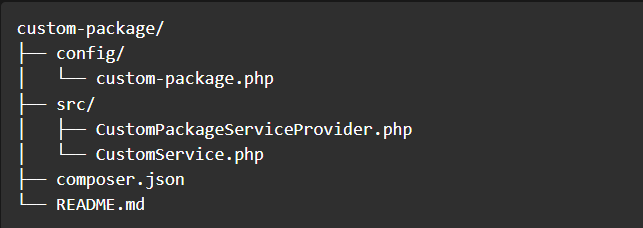
Step 2: Create composer.json for Your Package
Create composer.json inside your package:
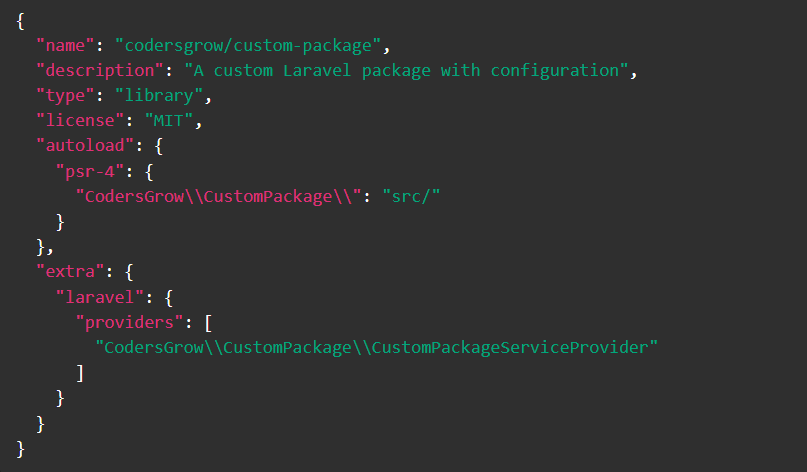
Run autoload refresh:

Step 3: Create Configuration File
Create config/custom-package.php:
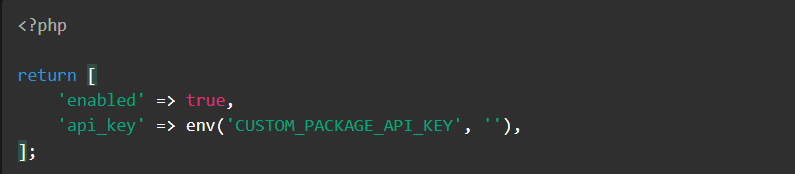
This file will be publishable to the main Laravel app.
Step 4: Create the Service Provider
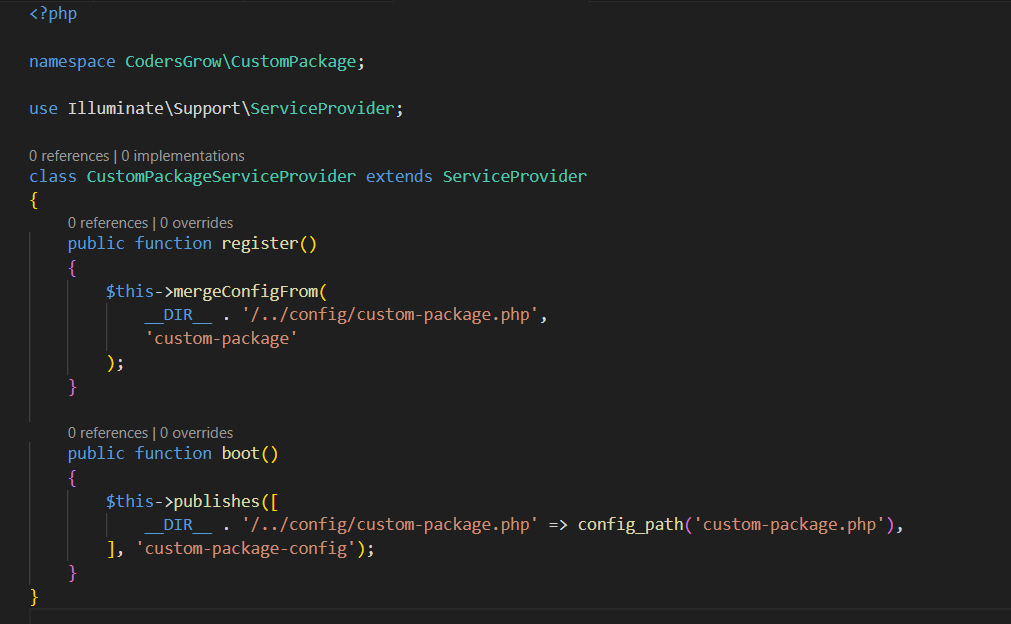
The service provider is the core of your Laravel package. It acts as the bridge between your package and the Laravel application.
Begin by creating a new service provider class inside the src directory of your package. This class will be responsible for registering bindings, configurations, routes, views, and other package services.
Once created, register the service provider so Laravel can automatically load and initialize your package when the application boots.
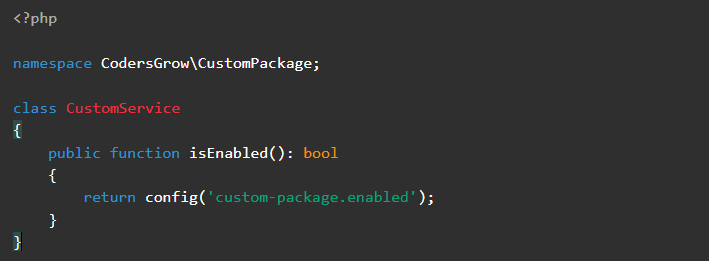
Step 5: Create Package Logic Class
Step 6: Use Configuration in Laravel App
Publish the configuration file:
php artisan vendor:publish --tag=custom-package-config
This will create: config/custom-package.php
Now you can update values as needed.
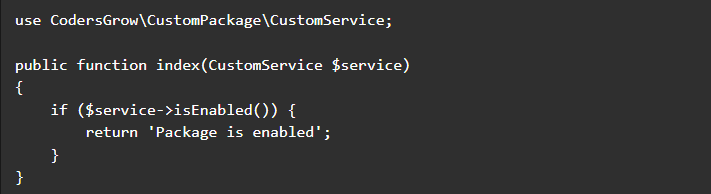
Step 7: Use Your Package in Code
Example usage in a controller:
Step 8: Register Package Locally (Optional)
If auto-discovery is disabled, add to config/app.php:

Best Practices for Laravel Package Development
- Use clear namespaces
- Add README documentation
- Make configuration publishable
- Avoid hardcoded values
- Support auto-discovery
- Follow PSR standards
Conclusion
Creating a custom Laravel package with configuration allows you to build scalable, reusable, and professional Laravel solutions. With service providers, config publishing, and auto-discovery, Laravel makes package development clean and powerful.
This approach is perfect if you plan to:
- Sell Laravel products
- Build internal reusable tools
- Publish packages on Packagist
Happy Coding 🚀
👉 That’s it! You’ve just built a React frontend inside WordPress without React NPM dependencies.
👉 Submit your request now and let’s start building your dream eCommerce store.
📧 Have questions before you start? Visit our Contact Page
🌐 Browse our full range of services at codersgrow.com
🛍️ Check out our Store for ready-to-use solutions
📖 Explore our Blogs for insights, tips, and industry updates