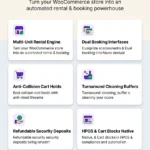
Understanding how to build a WooCommerce equipment rental website is essential for businesses that hire out expensive tools, machinery, audio-visual gear, and construction hardware. While standard e-commerce shops treat inventory as permanently sold, equipment rental requires dynamic date-range reservations, turnover buffers for inspection and cleaning, and refundable security deposits to protect your capital.
In this comprehensive guide, we demonstrate how to build a WooCommerce equipment rental website from initial store configuration to live equipment checkout using RentEngine – Rental & Booking Manager for WooCommerce.

RentEngine • Complete Equipment Rental Management Architecture
1. What Problem It Solves
Equipment rental companies face severe logistical bottlenecks when trying to run on standard WooCommerce:
- Asset Damage Exposure: High-value machinery leased without damage deposits risks expensive repair bills.
- Maintenance Downtime Overlaps: If an excavator or cinema camera returns at 5:00 PM, it cannot immediately leave with another customer at 8:00 AM without maintenance inspection.
- Complex Tiered Pricing: Equipment rental contracts require tiered pricing (daily, weekly, and monthly rates) rather than simple flat fees.
With RentEngine, every equipment item is protected by automatic security deposits, maintenance buffer windows, and real-time availability calendars.
2. Who It Is For
This implementation standard is designed for:
- Heavy Machinery & Contractor Tool Hire: Skid steers, scissor lifts, generators, and concrete saws.
- Audio-Visual & Cine Gear Studios: Red/Arri cameras, cinema lenses, wireless mics, and lighting grids.
- Medical & Mobility Suppliers: Patient beds, oxygen concentrators, and electric wheelchairs.
- Event Staging Companies: Trussing, staging decks, LED walls, and sound reinforcement.
3. How It Works: Step-by-Step Equipment Hire Blueprint
Follow these 4 implementation steps to launch your equipment hire platform:
Step 1: Set Up Equipment Inventory & Serial Tracking
Under your WooCommerce product screen, convert items to Rental Products. Specify how many units exist in your rental fleet (e.g. 5 identical Sony FX6 cameras) and assign individual serial numbers for checkout verification.
Step 2: Define Maintenance Buffers
Configure automated turnover buffers (e.g. 24 hours between hires). RentEngine locks this buffer automatically upon return so your technicians can test, clean, and recharge gear before the next reservation begins.
Step 3: Enable Dynamic Duration Tiers
Set up multi-tier equipment rates: Daily ($100/day), Weekly ($400/week), and Monthly ($1,200/month). The plugin automatically applies the optimal price tier based on the customer’s selected calendar dates.

Dynamic Pricing Engine • Automated tiered rates for short-term and extended equipment contracts
Step 4: Configure Security Deposit Protection
Define a refundable equipment deposit (e.g. $250 or 20% of equipment value). During checkout, this amount is charged alongside the hire fee and held in reserve until the equipment is safely returned and inspected.
4. Features of RentEngine for Equipment Rental
- Real-Time Fleet Availability: Multiple identical items tracked seamlessly across overlapping booking dates.
- Maintenance Turnover Automation: Automatically block buffer hours/days between consecutive hires.
- Integrated Security Deposits: Direct gateway deposit collection with 1-click refunding after equipment inspection.
- HPOS Sub-Millisecond Database: Built on High-Performance Order Storage with zero database postmeta clutter.
5. Real-World Equipment Use Cases
- Drone & Gimbal Rental: Rents professional cinema drones with a mandatory $500 security deposit and a 2-day inspection buffer.
- Power Tool Depot: Hires pressure washers and floor sanders with hourly slots and overnight return checklists.
6. Pricing: Pure Independence with Zero Commission
Avoid SaaS rental platforms that charge $200+/month plus a percentage cut of every rental contract. RentEngine is a one-time purchase that lets you keep 100% of your rental revenue.
7. Live Interactive Demo
Explore the live equipment booking widget, interactive calendar date selection, and checkout flow on our RentEngine Live Demo Sandbox.
8. Documentation & Setup Walkthroughs
Access extensive documentation covering inventory quantity setups, custom hooks, and template overrides on the RentEngine Documentation Hub.
9. Verified Customer Reviews
“RentEngine allowed us to migrate off an expensive SaaS platform and save over $600 a month in subscription and transaction fees. Equipment booking is seamless and reliable.”
— David Sterling, ProGear Camera Rentals
10. Frequently Asked Questions (FAQs)
Can I track individual serial numbers for identical equipment units?
Yes. RentEngine allows assigning internal asset identifiers and serial numbers to manage individual items in your rental pool.
How does RentEngine handle late equipment returns?
Overdue rentals are highlighted in the admin operations dashboard, allowing store managers to apply late-fee surcharges directly from the order screen.
Can customers rent equipment accessories alongside the main unit?
Yes. RentEngine supports multi-item rental carts, allowing customers to add lenses, tripods, and extra batteries in a single reservation checkout.
11. Changelog
v1.0.0 (September 2026)
- Enterprise equipment rental engine with serial number management.
- Dynamic tiered pricing for daily, weekly, and monthly equipment contracts.
- Automated turnover buffer windows for maintenance and inspection.
- Native HPOS database optimization.
12. Dedicated Support Desk
Have questions about configuring your equipment rental catalog? Get prompt assistance from verified WordPress engineers at the CodersGrow Support Desk.