
Implementing an automated shopify free gift with purchase strategy is one of the most reliable ways for high-growth e-commerce brands to increase Average Order Value (AOV) without slashing profit margins through destructive discounts.
While traditional flat percentage discounts condition shoppers to devalue your catalog, free gift incentives tap into positive gamification. Shoppers are eager to add one or two more items to their cart when they see a tangible reward within arm’s reach. In this comprehensive guide, we’ll examine how automated cart gift rules work, compare default Shopify capabilities against dedicated Smart Cart engines, and walk through setting up a zero-friction gift campaign that converts visitors into higher-value buyers.
The Psychology Behind a Shopify Free Gift with Purchase
Why do gift promotions outperform standard sitewide sales? Leading behavioral commerce research by the Baymard Institute reveals that unexpected costs and lack of perceived checkout value are primary contributors to cart abandonment. A gift with purchase (GWP) fundamentally changes customer psychology in three distinct ways:
- Perceived Value vs. Margin Erosion: Giving away a complementary product with a perceived $25 retail value that costs $4 to manufacture preserves substantially more gross margin than offering a sitewide 20% discount on a $120 order.
- Goal Gradient Effect: When shoppers see a real-time progress bar counting down to a shopify free gift with purchase, their shopping motivation shifts from price sensitivity to milestone achievement.
- Product Sampling & Retention: Free gifts serve as an exceptional sampling mechanism for new releases, travel sizes, or high-margin accessories, creating future repeat purchase cycles.
The Limitations of Default Shopify Gift Capabilities
While the native Shopify Discounts engine supports automatic “Buy X Get Y” rules, merchants quickly run into operational roadblocks when scaling dynamic cart incentives:
- No Visual Cart Progress: Standard Shopify themes do not provide a visual milestone bar inside the cart drawer. Shoppers have no visual feedback on how many dollars they need to spend to unlock the gift.
- Manual Customer Addition Required: With basic Shopify discount rules, customers frequently have to manually locate the free product in your catalog and add it to their cart before the discount applies. If they forget, they miss the gift and leave frustrated.
- Friction and Broken Stock Handling: If a promotional gift variant runs out of stock, default Shopify carts often fail silently or produce checkout validation errors.
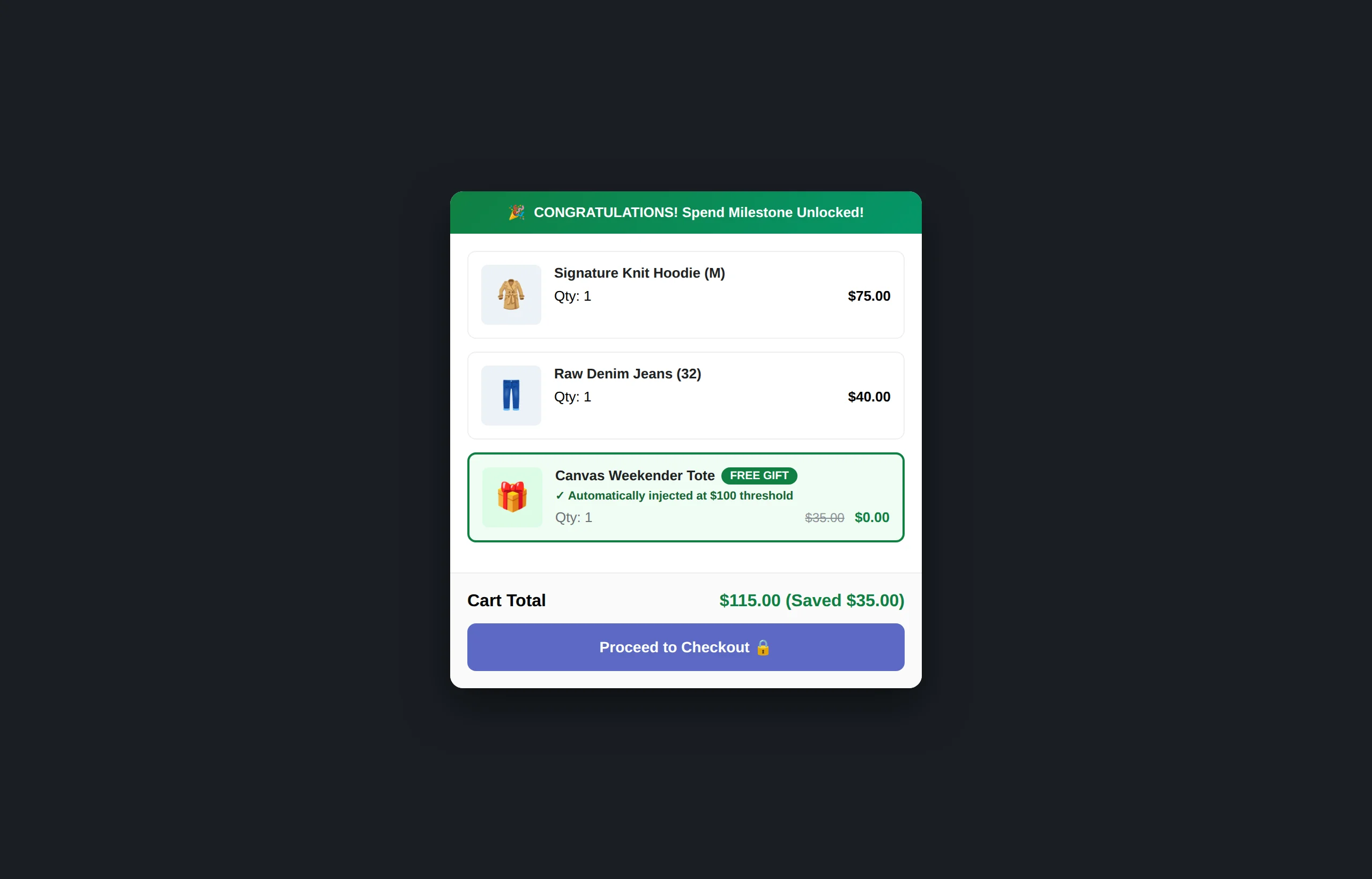
3 High-Converting Free Gift Models for Shopify
Successful DTC brands don’t rely on generic giveaways. They structure incentive tiers around specific customer unit economics:
1. Tiered Milestone Spending Rewards
Rather than a single hurdle, structure progressive milestones to stretch order totals. For instance: Spend $50 for Free Shipping, Spend $80 for a Free Deluxe Sample, and Spend $120 for an Exclusive Full-Size Product. Each unlocked milestone creates immediate momentum toward the next tier.

2. Category & Product Triggered Gifts
Pair specific promotional items with complementary parent purchases. For example, buying any premium leather boot automatically unlocks a complimentary waterproof leather balm directly inside the slide drawer.
3. Mystery or Seasonal Gift Surprises
Utilize seasonal urgency (Black Friday, Summer Kickoff, Holiday Bundles) to offer limited-edition mystery gifts that drive checkout completion before stock expires.
How to Set Up a Seamless Shopify Free Gift with Purchase Workflow
To eliminate manual coupon entry and clunky page reloads, modern Shopify merchants use CartFlux Shopify Smart Cart to handle the entire gift lifecycle automatically inside an Online Store 2.0 slide cart drawer.
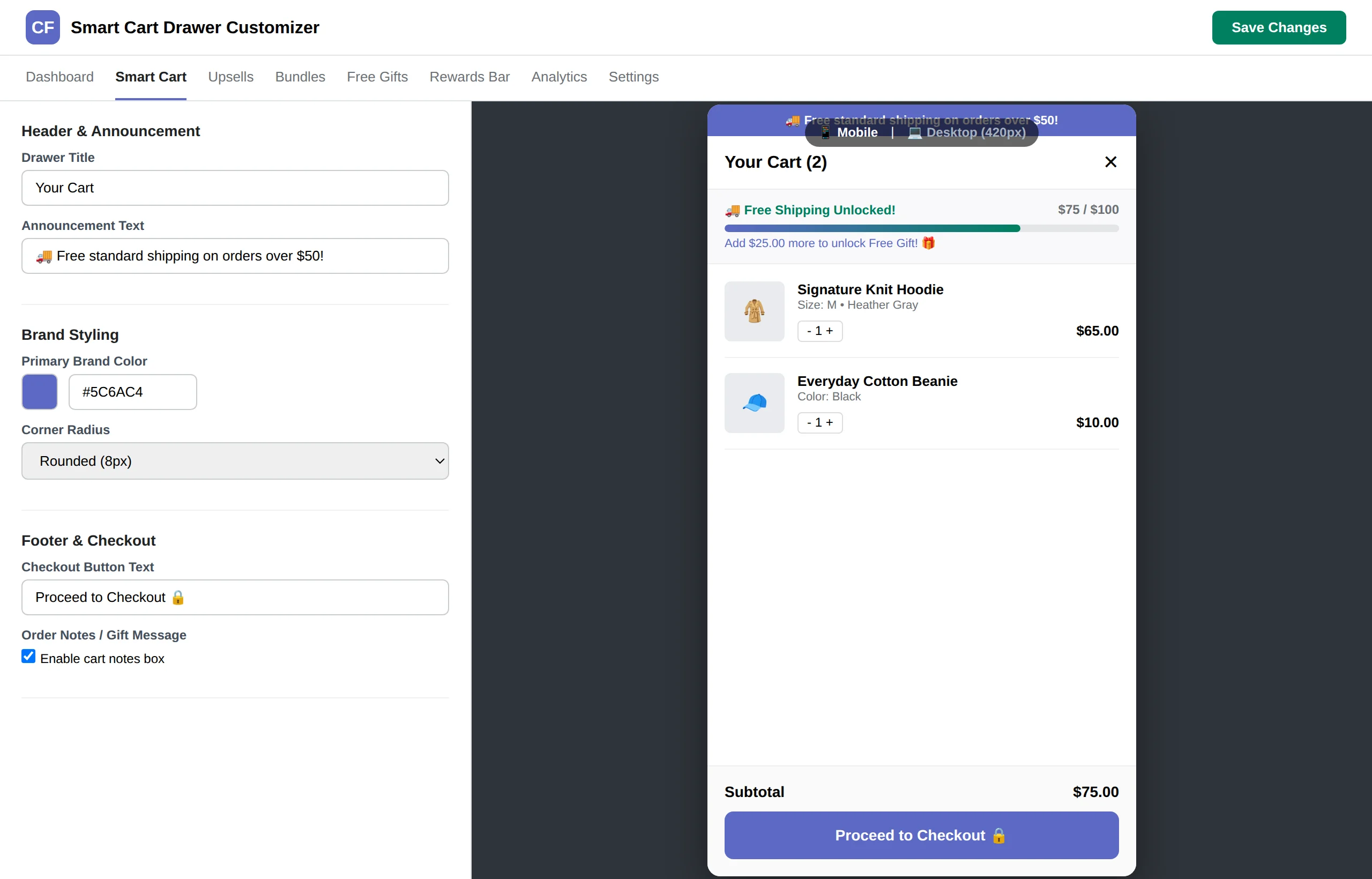
Here is the streamlined step-by-step setup:
- Define Your Free Gift Product: In Shopify Admin, create or select the specific gift product variant. You can set the price to $0 or let CartFlux apply a 100% discount rule.
- Establish the Spend Threshold: In the CartFlux dashboard, navigate to Rewards > Free Gifts and configure your threshold tier (e.g., $75.00).
- Configure Auto-Add Behavior: Toggle Automatic Cart Injection so the gift is automatically added to the drawer the instant the customer’s cart subtotal meets the condition.
- Enable Auto-Removal Safeguards: If a shopper removes items and drops below the required $75 threshold, CartFlux automatically removes the free gift to safeguard store margins.
- Activate Celebration Micro-Interactions: Turn on subtle celebration confetti animations so customers experience an immediate visual dopamine hit upon qualifying.
Best Practices to Protect Margins and Maximize ROI
To maximize the ROI of your shopify free gift with purchase campaign, choose gift items that have high perceived value but low unit acquisition cost. Additionally, keep these golden rules in mind:
- Set Thresholds 15–25% Above Current AOV: If your store’s baseline AOV is $65, set your first gift milestone at $80 or $85. Setting it too low subsidizes orders that would have completed anyway, while setting it too high causes friction.
- Combine with In-Cart Upsells: Pair your gift progress bar with 1-click in-cart upsells (such as accessories or warranty add-ons) so customers have quick, inexpensive options to bridge the gap to the next milestone.
- Monitor Attribution & Lift: Always measure the true mathematical AOV difference between gift-influenced sessions and uninfluenced sessions using verified conversion telemetry.
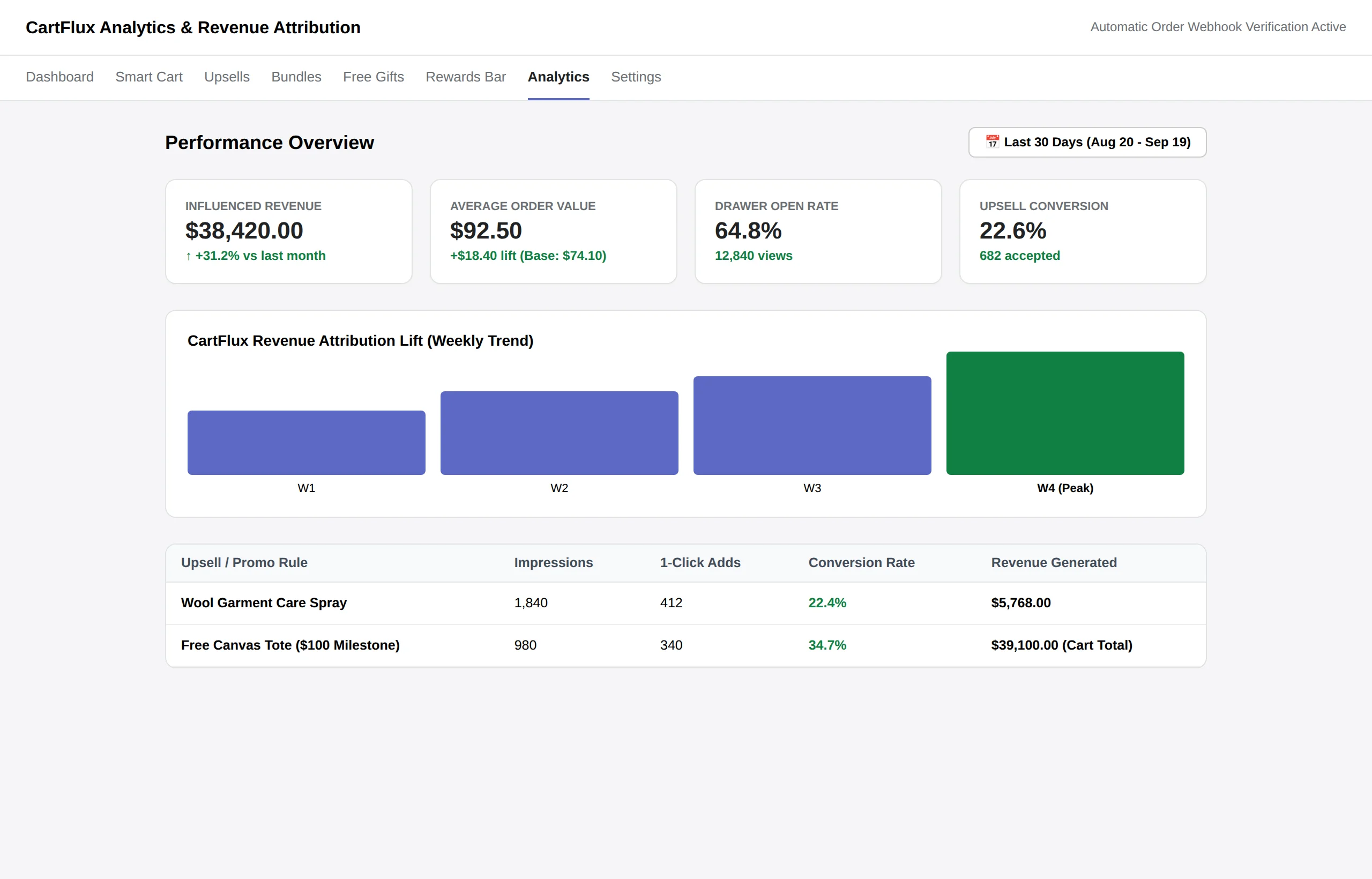
GWP Implementation Comparison: Native Shopify vs. CartFlux
| Feature / Capability | Default Shopify Automatic Discounts | CartFlux Smart Cart Engine |
|---|---|---|
| Visual In-Cart Progress Bar | ❌ None (Static cart page only) | ✅ Real-time animated multi-tier bar |
| Auto-Add Gift into Drawer | ❌ Requires manual product addition | ✅ 100% automated instant injection |
| Auto-Remove upon Value Drop | ⚠️ Inconsistent / Cart errors | ✅ Automatic graceful cleanup |
| Performance & Asset Size | Varies by theme code | ✅ Sub-16KB vanilla TypeScript, 0 bloat |
| Integrated 1-Click Upsells | ❌ Requires secondary app | ✅ Built-in drawer recommendations |
Frequently Asked Questions (FAQ)
Can I configure multiple free gift tiers in the same cart?
Yes. With CartFlux, you can configure progressive milestones such as Spend $60 get Gift A, and Spend $100 get Gift B. As shoppers add items, each milestone unlocks dynamically in sequence.
What happens if the free gift product runs out of stock?
CartFlux automatically checks inventory levels in real time. If a designated free gift item becomes unavailable, the progress bar can fall back to an alternate reward or notify the merchant, preventing failed checkout submissions.
Does the free gift with purchase feature work with multi-currency?
Yes. CartFlux integrates natively with Shopify Markets and dynamic currency formatting, converting spending thresholds automatically into the shopper’s active local currency.
Will installing a smart cart drawer slow down my Shopify store?
CartFlux is built to exceed Shopify’s Built-for-Shopify speed criteria. The storefront client script is under 16KB uncompressed, uses zero jQuery or heavy external dependencies, and loads asynchronously via Shopify Theme App Extension embeds.
Take Your Shopify Cart Conversions to the Next Level
Transforming your cart from a passive transaction step into an automated AOV booster is one of the highest-leverage optimizations you can make on Shopify. By offering a gamified, automated free gift with purchase, you give customers an irresistible reason to spend more on every visit.
Explore our deep-dive guide on the CartFlux Shopify Smart Cart Drawer to learn how slide carts, volume discounts, and 1-click upsells work together in a single unified engine.
